100+ languages
Auto-detect or choose your preferred language.
Paste any YouTube link and get an accurate, timestamped transcript in seconds—ready to search, translate, summarize, or hand to AI that watches what happens on screen.
Explore AI Watch See real frames, study notes, and timestamped answers.Transcript, refined
Pick the language, restructure the text, clean the wording, and export it anywhere you work.
Auto-detect or choose your preferred language.
Paragraphs, timestamped lines, or plain text.
Filter sensitive words and view before → after instantly.
TXT, SRT, VTT, CSV, JSON.
Optional visual analysis
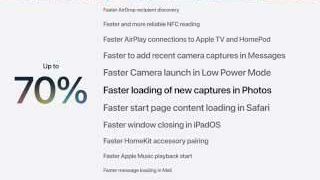
AI Watch reads the frames as well as the words, then answers with the exact moment it saw. Here it is on Apple’s public WWDC 2026 keynote.
What the analysis recorded
A slide shows the performance improvement for loading new photos.
Grounded answer
QWhat changes on screen at 10:59?
AA performance slide appears — photo loading is credited as up to 70% faster.
Frame 10:59Analysis 10:33–11:06
Transcript credits and Watch minutes are separate allowances. Free includes 10 Watch minutes — no card.
Accurate, timestamped
word-for-word.
Find, clip, and focus on
what you need.
Key ideas, chapters, and
actionable notes.
Export anything—or watch
the video with AI.
Instant results with highlighted matches
and total count.
In this video, I want to show you how to build a second brain that helps you capture ideas and actually use them.
The problem is, we forget most of what we learn.
So the first step is simple: capture ideas quickly and consistently.
One click takes you to the exact
timestamp in the video.
 ▶“capture ideas quickly” 00:42
AI distills the video into key ideas,
chapters, action items, and notes.
✓ Capturing ideas is the first step to building a second brain.
✓ Use tools you already have—phone, laptop, and cloud.
✓ Organize by projects and topics to create clarity.
Select any quote, create a clip,
and keep the source attached.
“Consistency matters more than perfection. Small daily actions compound over time.”00:42 · Building a Second Brain in 2024 ▣
Translate your transcript into any
language instantly.
في هذا الفيديو، أريد أن أوضح لك كيفية بناء عقلٍ ثانٍ يساعدك على التقاط الأفكار واستخدامها فعلياً.
المشكلة هي أننا ننسى معظم ما نتعلمه.
لذا، الخطوة الأولى بسيطة: التقط الأفكار بسرعة وبشكل منتظم.
Export your transcript, notes, and
clips in the format you need.
Accurate, timestamped
word-for-word.
Find, clip, and focus on
what you need.
Key ideas, chapters, and
actionable notes.
Export anything—or watch
the video with AI.
In this video, I want to show...
The problem is, we forget...
So the first step is simple...


Search everything. Jump to the exact moment.
Quote, clip, and repurpose with confidence.
Every quote and clip stays linked to time and file.
Use built-in AI or connect the models you prefer.
From lectures to study guides,
make learning stick.
━━━━━━
━━━━━━
━━━━━━
⇩ Export notesTurn ideas into content
people love.
━━━━━━━━━━
━━━━━━━━
━━━━━━
Find, verify, and bring
evidence together.
━━━━━━
━━━━━━
━━━━━━
Citation APA⌄▤ CSV ⇩ JSON ☆Process video backlogs and
move work forward.
▤ Product demos 24 videos
▤ Interview archive 18 videos
▤ Research review 12 videos
Export queue✓ Transcript CSV
✓ JSON archive
Open bulk tools ↗Every month, with
no account required.
Transcribe and translate
in over one hundred languages.
TXT, SRT, VTT,
CSV, and JSON.
We credit your account
when issues occur.
For transcripts and text AI.
Resets every month.
separate,
simple
For optional visual analysis.
Resets every month.
Cost is shown before analysis begins.Failed jobs are automatically refunded.
Integrate transcripts and summaries into
your product, automations, or dashboards.
curl -X POST https://vidwords.com/api/transcripts \
  -H "Authorization: Basic YOUR_API_TOKEN" \
  -H "Content-Type: application/json" \
  -d '{
    "ids": ["dQw4w9WgXcQ"],
    "lang": "en"
}'Connections use HTTPS and
authenticated app routes.
Processing services receive only
what each request needs.
Remove saved transcripts from
your account history.
Every job is tracked end-to-end
with clear status and details.
▶ Product Demo.mp4May 12, 2024 · 10:42 AM
▤ Transcript
English (Auto)12:45
1 transcriptcredit
CompletedView history ↗● Product Demo.mp4May 12, 2024 · 10:48 AM
◉ AI Watch
Frame analysis13 min
13 Watchminutes
CompletedView history ↗▲ Product Demo.mp4May 12, 2024 · 10:58 AM
◉ AI Watch
Frame analysis13 min
13 Watchminutes
FailedView history ↗↻ Failed Watch jobs are automatically refunded.
$0 / month
$10 / month
Everything in Free, plus:$25 / month
Everything in Starter, plus:$69 / month
Everything in Pro, plus:Flexibility without confusion.
● Transcript credits For transcripts & features.
▶ Watch minutes For video analysis & AI Watch.
Clear costs. Simple usage.
▣ Credits shown before you run.
◷ Failed jobs are automatically refunded.

Yes—really. Create up to 25 transcripts every month with no account, no card, and no trial clock. Sign up only when you want history, bulk tools, or higher limits.
We use the video’s own caption track when it’s available, and speech-to-text when it isn’t—so quality tracks the source. Every line is timestamped, and you can clean the wording in a click.
VidWords is an independent tool that works with publicly available videos and their captions. It isn’t affiliated with, endorsed by, or connected to YouTube or Google.
Public videos with accessible captions, or ones we can transcribe directly. Private, members-only, and age-restricted videos aren’t supported.
Auto-detect or choose from available languages, then translate the whole transcript into any of 100+ languages instantly.
Transcript credits create transcripts and power the text tools—search, translate, summaries, and chat. Watch minutes separately meter optional frame-level video analysis. Costs are always shown before you run.
No. Start AI Watch straight from a YouTube link—it combines the transcript with scene-aware frames so answers are grounded in what’s actually on screen.
TXT, SRT, VTT, CSV, and JSON—plus a developer API for automations and integrations.
Yes. Paid plans are month-to-month—upgrade, downgrade, or cancel whenever you like. Jobs that fail on our side are automatically refunded to your balance.
Everything runs over HTTPS, processing services receive only what each request needs, and you can delete saved transcripts from your history at any time.
Paste a YouTube link and get a clean, searchable transcript in seconds.